Introduction
Ever checked your Google Ads report and wondered why you’re paying for clicks from people who were never likely to become customers? Negative keywords in Google Ads help solve this problem by preventing ads from appearing for searches that don’t match your products, services, or business goals.
Getting clicks only matters when they come from the right audience. By filtering irrelevant searches, businesses can protect their advertising budget, improve traffic quality, and make PPC campaigns more efficient.
What Are Negative Keywords in Google Ads?
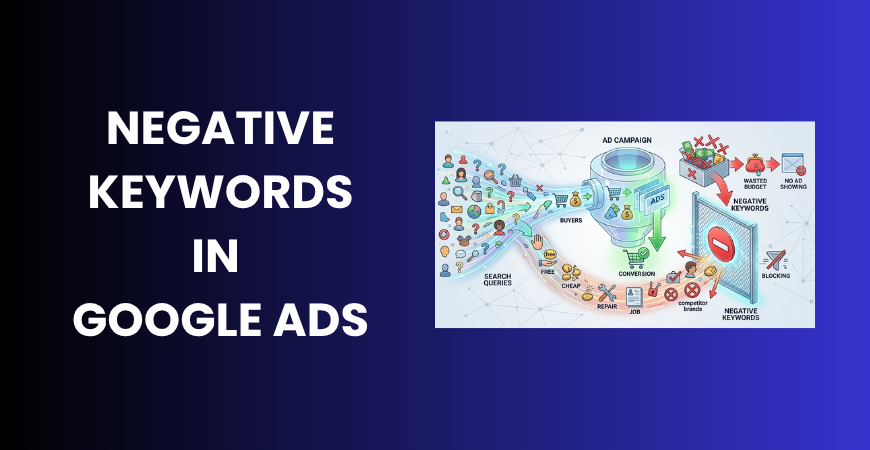
Negative keywords are terms advertisers add to prevent their ads from appearing for unwanted searches. While regular keywords help Google identify searches where you want your ads to appear, negative keywords work in the opposite way by excluding irrelevant searches.
For example, a business offering paid digital marketing courses may target “digital marketing course” but exclude searches such as “free digital marketing course,” “digital marketing course jobs,” or “digital marketing course PDF.”
This is especially useful in a Google Ads search campaign, where ads can appear for different searches related to targeted keywords. The goal isn’t to block traffic unnecessarily but to remove searches that are unlikely to produce valuable results.
Why Do Negative Keywords Matter?
Reduce Irrelevant Clicks
An irrelevant click can still cost money even when the visitor has no intention of buying. Someone searching for a free tutorial, for example, may click an advertisement for a paid service.
Negative keywords help prevent such searches from consuming your budget.
Improve Traffic Quality
Filtering irrelevant queries allows a greater share of paid traffic to come from users whose intent matches your offer. This can improve the overall quality of visitors reaching your website.
Protect Your Advertising Budget
Every campaign has a limited budget. Spending money on searches that have little chance of generating leads or sales reduces the amount available for valuable traffic.
Regular Google Ads management can help identify these inefficient searches and add relevant exclusions.
Improve Campaign Efficiency
Irrelevant searches can also make campaign data harder to interpret. Removing them gives advertisers cleaner performance data and helps them focus on searches that matter.
This makes negative keyword management an important part of a broader performance marketing guide focused on measurable results and efficient spending.
Negative Keyword Match Types Explained
Google Ads provides different negative keyword match types for controlling which searches should be excluded.
| Match Type | Best Used For | Example |
| Negative broad | Wider unwanted combinations | free course |
| Negative phrase | Specific unwanted phrases | “free course” |
| Negative exact | Specific search queries | [free digital marketing course] |
Negative Broad Match
It can help exclude searches containing the specified negative terms. It is useful when you want to prevent a wider range of unwanted combinations.
Negative Phrase Match
It provides more control when you want to exclude searches containing a particular phrase.
Negative Exact Match
It is useful when you want to block a specific search without excluding other related searches.
Choose match types carefully because overly broad exclusions can prevent legitimate customers from seeing your ads.
How to Find Negative Keywords
Finding the right negative keywords in Google Ads is more important than simply creating a long list. Your strategy should be based on actual search behavior and customer intent.
Review the Search Terms Report
The Search Terms Report is one of the best places to find negative keyword opportunities. It shows the searches that triggered your ads, allowing you to identify irrelevant queries.
For example, a PPC agency may find that its ads are appearing for “PPC course,” “PPC jobs,” or “how to learn PPC.” If the agency only provides PPC services, these searches may not represent potential customers.
Identify Irrelevant Search Intent
Look for searches related to:
- Jobs and careers
- Free resources
- Tutorials
- DIY solutions
- Downloads
- Unrelated products
However, don’t automatically exclude these terms. First determine whether they could still represent valuable customers.
Check Conversion Data
A search that looks irrelevant may sometimes generate a lead or sale. Conversion tracking helps advertisers determine whether specific searches actually produce valuable actions.
For example, a business offering affordable services shouldn’t automatically exclude the word “cheap” if those searches regularly generate customers.
Create Campaign-Specific Lists
Different campaigns may target different audiences and products. A negative keyword that makes sense for one campaign may be inappropriate for another.
Keep exclusions aligned with each campaign’s objective rather than applying one large list everywhere.
Review Regularly
Negative keyword research isn’t a one-time task. New search queries can appear as campaigns collect more data, so regular search-term reviews help keep campaigns relevant.

Negative Keyword Examples by Business Type
| Business Type | Possible Negative Keywords |
| Digital marketing course | free, jobs, salary, PDF |
| PPC agency | course, tutorial, jobs, salary |
| Luxury hotel | cheap, hostel, free |
| E-commerce brand | wholesale, used, repair |
| Professional service | DIY, free, template |
These are examples rather than universal recommendations. Always consider your actual customers before excluding a term.
For instance, an e-commerce business selling refurbished products shouldn’t automatically exclude “used.” The objective is to remove irrelevant intent, not simply reduce clicks.
How Digiad Solution Helps Reduce Wasted PPC Spend
Effective negative keyword management requires continuous analysis rather than simply adding a few exclusions when a campaign launches.
Digiad Solution can help businesses analyze search terms, identify irrelevant queries, develop negative keyword lists, review campaign structure, manage match types, and monitor advertising performance.
Businesses requiring ongoing support can also benefit from PPC management services, including campaign monitoring, keyword optimization, budget management, and performance analysis.
The goal is to direct more advertising budget toward searches that have genuine potential to generate leads, sales, or other valuable business actions.
Frequently Asked Questions
What are negative keywords in Google Ads?
Negative keywords are terms advertisers use to prevent their ads from appearing for irrelevant or unwanted searches.
How do negative keywords reduce wasted spend?
They stop ads from showing for searches that don’t match the business’s products, services, or target audience, reducing irrelevant clicks.
Which negative keywords should I add?
Review your Search Terms Report and identify searches that don’t match your business intent. Common examples may include jobs, free resources, tutorials, or unrelated products.
How often should I review negative keywords?
Review them regularly, particularly when campaigns are new or generating significant search volume. The ideal frequency depends on campaign size and activity.
Can negative keywords hurt a Google Ads campaign?
Yes. Overly broad exclusions can remove valuable traffic. Always consider search intent and conversion data before adding a negative keyword.
Conclusion
Negative keywords in Google Ads help businesses prevent irrelevant searches from consuming their advertising budget. By reviewing search queries, understanding user intent, choosing suitable match types, and updating exclusions regularly, advertisers can improve traffic quality and campaign efficiency. The objective isn’t to block as much traffic as possible, but to ensure more of the PPC budget reaches searches with genuine business potential.